API Overview
The Flow API is a RESTful API that allows you to programmatically schedule and manage social media posts across multiple platforms.
How Flow Works
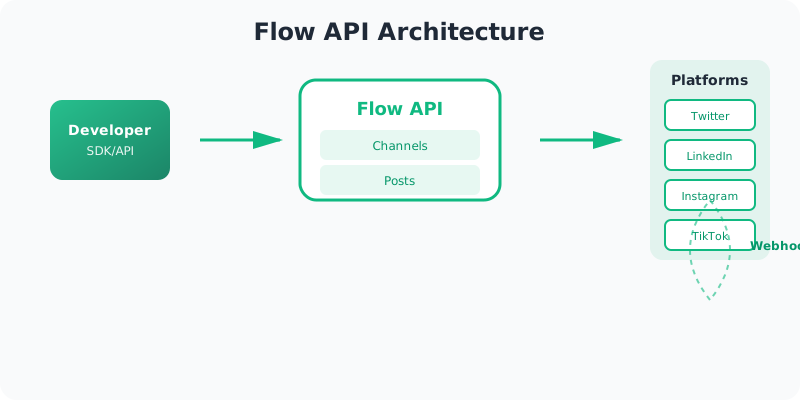
Developer
Use SDK or API to create posts
Flow API
Manages channels, schedules, and delivery
Platforms
Posts delivered to all connected platforms
Webhooks
Real-time notifications of delivery status
Base URL
https://api.flowsocial.app/v1
Authentication
All API requests require authentication using an API key. Include your API key in the Authorization header:
Authorization: Bearer flow_sk_live_abc12345_xyz789...
See the Authentication Guide for details.
Request Format
All requests should include:
Content-Type: application/jsonheader (for POST/PATCH requests)Authorization: Bearer <your-api-key>header- JSON body for POST/PATCH requests
Response Format
All responses are JSON objects. Successful responses include the requested data:
{
  "data": {
    "id": "channel_123",
    "name": "My Channel",
    "color": "#3B82F6"
  }
}
Error responses follow a standardized format:
{
  "error": {
    "type": "validation_error",
    "message": "Invalid request",
    "code": "VALIDATION_ERROR",
    "details": [
      {
        "field": "name",
        "message": "Name is required"
      }
    ]
  }
}
Rate Limits
- Default: 100 requests per minute per API key
- Post Creation: 30 requests per minute
- Webhook Creation: 10 requests per minute
- API Key Creation: 5 requests per minute
Rate limit headers are included in every response:
X-RateLimit-Limit: Maximum requests per windowX-RateLimit-Remaining: Remaining requests in current windowX-RateLimit-Reset: Unix timestamp when the rate limit resets
See Rate Limits for details.
Pagination
List endpoints support pagination using query parameters:
page: Page number (default: 1)per_page: Items per page (default: 20, max: 100)
Example:
GET /v1/posts?page=2&per_page=50
Filtering
Many list endpoints support filtering using query parameters:
GET /v1/posts?filter[status]=queued&filter[channelId]=channel_123
Advanced filtering is available using the filter query parameter:
GET /v1/posts?filter[status][eq]=queued&filter[scheduledFor][gte]=1703000000000
See Querying for details.
Sorting
List endpoints support sorting using the sort parameter:
GET /v1/posts?sort=-scheduledFor  # Descending
GET /v1/posts?sort=scheduledFor    # Ascending
Idempotency
POST requests support idempotency keys to prevent duplicate operations:
POST /v1/posts
Idempotency-Key: unique-key-123
Idempotency keys are valid for 24 hours.
Webhooks
Configure webhooks to receive real-time notifications about events:
post.created- A new post has been scheduledpost.delivered- A post has been successfully publishedpost.failed- A post failed to publishpost.blocked- A post was blocked
See Webhooks for details.
Error Handling
The API uses standard HTTP status codes:
200 OK- Success201 Created- Resource created400 Bad Request- Invalid request401 Unauthorized- Invalid or missing API key403 Forbidden- Insufficient permissions404 Not Found- Resource not found429 Too Many Requests- Rate limit exceeded500 Internal Server Error- Server error
See Error Handling for details.
Endpoints
Channels
Manage channels for organizing your posts:
GET /v1/channels- List channelsPOST /v1/channels- Create channelGET /v1/channels/:id- Get channel detailsPATCH /v1/channels/:id- Update channelDELETE /v1/channels/:id- Delete channel
Posts
Manage social media posts:
GET /v1/posts- List postsPOST /v1/posts- Create postGET /v1/posts/:id- Get post detailsPATCH /v1/posts/:id- Update postDELETE /v1/posts/:id- Delete postPOST /v1/posts/batch- Create multiple postsPATCH /v1/posts/batch- Update multiple postsDELETE /v1/posts/batch- Delete multiple posts
Connections
Manage platform connections:
GET /v1/connections- List connectionsDELETE /v1/connections/:id- Delete connectionPOST /v1/connections/:id/add-to-channel- Add connection to channelPOST /v1/connections/:id/refresh- Refresh connection tokenPOST /v1/connections/:id/verify- Verify connection statusPOST /v1/connections/verify-channel/:channelId- Verify all connections in a channel
OAuth Flows (Browser-based)
GET /v1/connections/twitter/auth- Start Twitter OAuthGET /v1/connections/twitter/callback- Twitter OAuth callbackGET /v1/connections/linkedin/auth- Start LinkedIn OAuthGET /v1/connections/linkedin/callback- LinkedIn OAuth callbackGET /v1/connections/meta/auth- Start Meta (Facebook/Instagram) OAuthGET /v1/connections/meta/callback- Meta OAuth callbackGET /v1/connections/tiktok/auth- Start TikTok OAuthGET /v1/connections/tiktok/callback- TikTok OAuth callback
Media
Upload and manage media files:
POST /v1/media/upload- Upload media fileGET /v1/media/:key- Get media fileDELETE /v1/media/:key- Delete media file
Webhooks
Manage webhooks:
GET /v1/webhooks- List webhooksPOST /v1/webhooks- Create webhookGET /v1/webhooks/:id- Get webhook detailsPATCH /v1/webhooks/:id- Update webhookDELETE /v1/webhooks/:id- Delete webhookGET /v1/webhooks/:id/deliveries- Get delivery historyPOST /v1/webhooks/:id/test- Test webhook
API Keys
Manage API keys:
GET /v1/api-keys- List API keysPOST /v1/api-keys- Create API keyGET /v1/api-keys/:id- Get API key detailsPATCH /v1/api-keys/:id- Update API keyDELETE /v1/api-keys/:id- Delete API key
Usage
Get usage information:
GET /v1/usage- Get current usage summaryGET /v1/usage/history- Get historical usage dataGET /v1/usage/day- Get usage for a specific day
SDKs
Official SDKs are available for:
Support
- 📧 Email: support@flowsocial.app
- 💬 Discord: Join our community
- 🐛 Issues: GitHub Issues